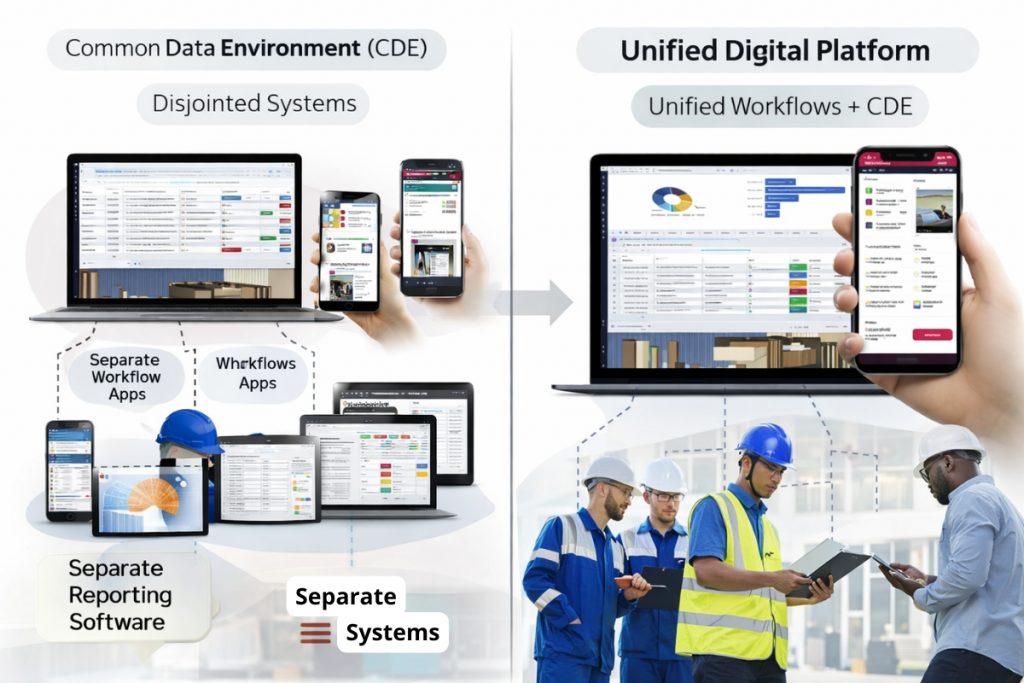
CDE vs Mobile Workflow Apps: Why Construction Companies Use Both
Across the construction, infrastructure, and asset management industries, Common Data Environments (CDEs) have become the backbone of information management. They provide a structured environment to manage documents, drawings, models, and project information in line with standards such as ISO 19650.
However, many organisations discover that a CDE alone is not enough. As projects progress and operational demands increase, teams often introduce separate mobile workflow apps to manage site inspections, snagging, fire door compliance, safety incidents, and other field-based activities.
This raises an important question: if the CDE is supposed to be the single source of truth, why do companies still need additional workflow tools?
Understanding the relationship between a CDE vs mobile workflow apps helps explain how digital construction environments really operate today.
In practice, leading organisations are moving towards integrated platforms that combine structured information management with real-time operational workflows, rather than relying on disconnected systems.
To understand the wider context of this shift, it is useful to explore how BIM is evolving into full lifecycle information management.
What a Common Data Environment (CDE) Does Well
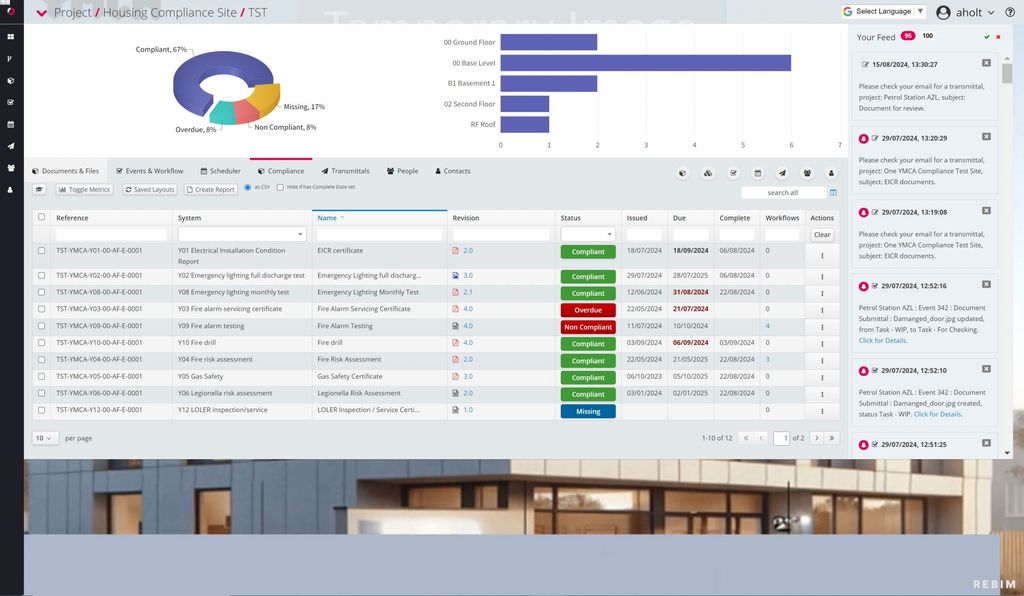
A Common Data Environment (CDE) is designed primarily for structured information management. Its core strengths typically include:
- Document and drawing control with version management
- Centralised storage of project information
- Collaborative design review using a variety of 2D and 3D information
- Approval workflows for formal document exchange
- Compliance with ISO 19650 and information management standards
- A controlled audit trail for project deliverables
These capabilities are essential. A properly implemented CDE ensures that project teams are working from controlled, approved information.
However, this structured environment focuses primarily on information governance rather than operational execution, which is why organisations often complement it with workflow-driven systems.
For design management, document control, and formal project communication, the CDE plays a critical role.
Where Mobile Workflow Apps Add Value
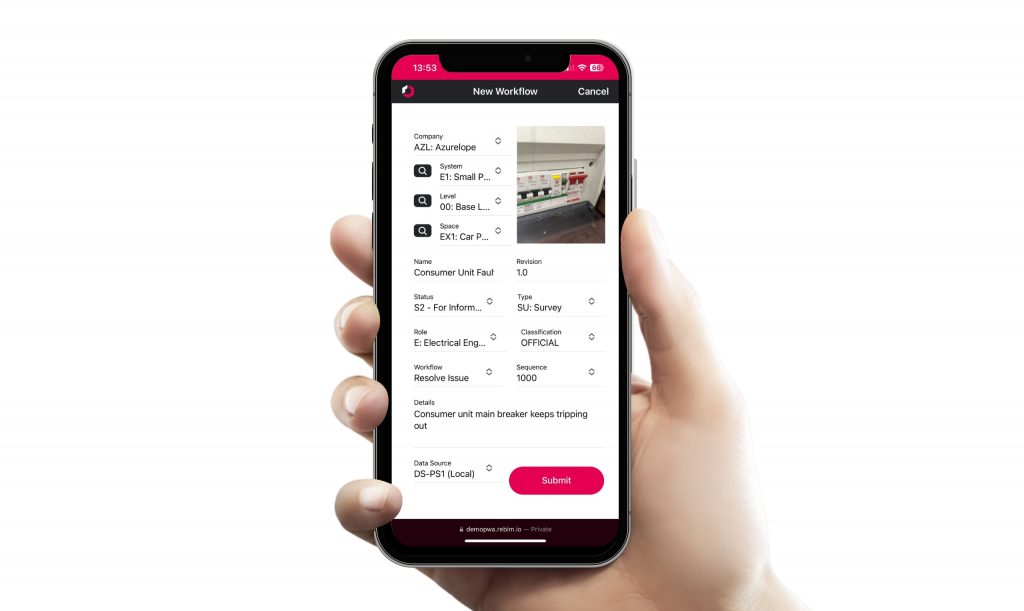
While CDEs are strong at document management, information management and design collaboration, construction projects involve many operational workflows that happen on site and in real time that support the development of approved information.
These include:
- Site snagging and defect management
- Fire door installation and inspection workflows
- Safety incident and near miss reporting
- Quality inspections and compliance checks
- Maintenance and remedial task management
These workflows are typically mobile-first activities, carried out by site teams using Mobile Workforce Management software on phones or tablets with communications and updates with office-based teams.
Mobile workflow apps are often introduced because they offer:
- Faster data entry on site
- Simple, task-focused interfaces
- Easy capture of photos and evidence
- Real-time issue tracking and assignment
- Greater usability for field teams
This improves adoption and ensures that workflows are actually followed in practice.
These workflows are not just operational conveniences, they are critical for capturing the information that feeds back into the wider project and asset lifecycle.
Operational and Construction Workflows: Real-World Examples
To see how these workflows operate within a structured environment, explore how configurable workflows are used across construction and asset management projects.
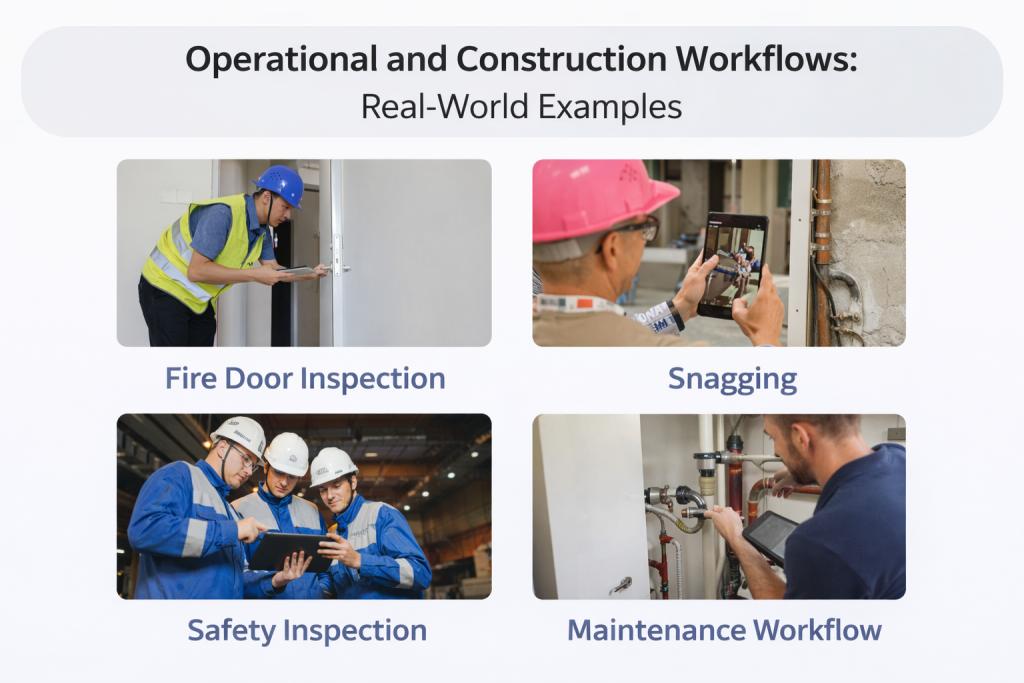
Operational and construction configurable workflows exist throughout the entire asset lifecycle, from initial construction through to long-term operation and maintenance.
These workflows capture critical information, provide audit trails, and ensure compliance with regulatory and contractual requirements.
Common operational and construction workflows include:
Site Snagging and Defect Management
Site teams can raise defects directly from mobile devices, attach photographic evidence, assign responsibility, and track resolution. This ensures clear accountability and faster issue resolution.
Safety Inspections and Compliance Checks
Routine safety inspections can be carried out using structured workflows, ensuring that required checks are completed consistently and evidence is recorded.
Accident and Near Miss Reporting (Including RIDDOR)
Incidents and near misses can be reported immediately from site, capturing key information and evidence. This supports investigation, compliance with reporting requirements such as RIDDOR, and continuous safety improvement.
Site Inspections and Inspection of Works
Inspection workflows ensure that installations and construction activities meet required standards, with approval stages and evidence captured throughout.
Fire Door Installation and Inspection Workflows
Fire door installation workflows capture installation evidence step-by-step, supporting certification schemes such as BM TRADA and maintaining a clear audit trail.
Inspection workflows ensure fire doors remain compliant throughout their operational life.
Fire Risk Assessment and Remedial Actions
Fire risk assessment findings can be converted directly into workflows, allowing remedial actions to be tracked through to completion, with full traceability.
Planned and Reactive Maintenance Workflows
Maintenance tasks can be raised, assigned, and tracked, ensuring assets remain operational and compliant.
Site Progress Checks and Walkrounds
Regular progress inspections can capture site status, issues, and observations, providing management with real-time visibility.
Key Observations With These Workflows:
These operational and construction focused configurable workflows generate critical information that must be reliable, accessible, and centrally managed.
When workflows are disconnected from the Common Data Environment, organisations risk fragmented information and incomplete reporting.
Integrating operational workflows with the central information environment ensures that all project and asset data contributes to a complete and reliable single source of truth.
Why Many Organisations End Up Using Both
In theory, a single platform could manage both document control and operational and construction workflows. In practice, many organisations deploy both a CDE and mobile workflow apps.
There are several reasons for this.
Usability and Workflow Design
Some CDE platforms provide workflow capabilities for information and document management, but these may not be optimised for mobile use with desktop office support or to deliver specialist operational or construction task workflows. Field teams often prefer tools designed specifically for on-site tasks with more flexible workflow capabilities.
Configuration Complexity
Configuring detailed operational workflows requires careful design, testing, and ongoing support. Some organisations lack the internal resources or support needed to configure these workflows effectively within their CDE. This is the case even if the CDE is capable, the customisation alone is often prohibitive or the CDE vendor is not able to provide direct support to customise features leaving the task to third party consultants.
As a result, specialist workflow tools are introduced to meet operational needs rather than trying to customise or force the existing CDE.
Project and Team Autonomy
Construction projects involve multiple organisations, contractors, and subcontractors. Each team may have preferred tools and established working methods.
This can lead to multiple systems being used alongside the core CDE.
The Hidden Cost: Data Fragmentation
While using multiple tools can solve immediate workflow needs, it introduces a new challenge: fragmented data. This is a problem since most organisations aspire to have “single source of truth”.
When workflows and information are spread across separate systems, organisations face difficulties such as:
- Lack of a complete, centralised project view
- Manual effort required to consolidate reports
- Reduced confidence in compliance and audit data
- Difficulty maintaining a true “single source of truth”
- Challenges supporting the “golden thread of information” (a key UK government building safety campaign)
This fragmentation reduces the effectiveness of digital transformation and increases operational risk.
In many cases, organisations only recognise this issue when reporting becomes inconsistent, audits become more complex, or compliance risks begin to emerge.
The goal of a Common Data Environment is centralised information management, but disconnected workflow tools can undermine this objective.
At this point, organisations face a key decision: continue managing multiple disconnected tools, or move towards a unified platform that integrates both information management and operational workflows.
Understanding the implications of CDE vs mobile workflow apps is therefore essential for designing effective digital asset management environments.
The Shift Towards Unified Workflow and Information Platforms
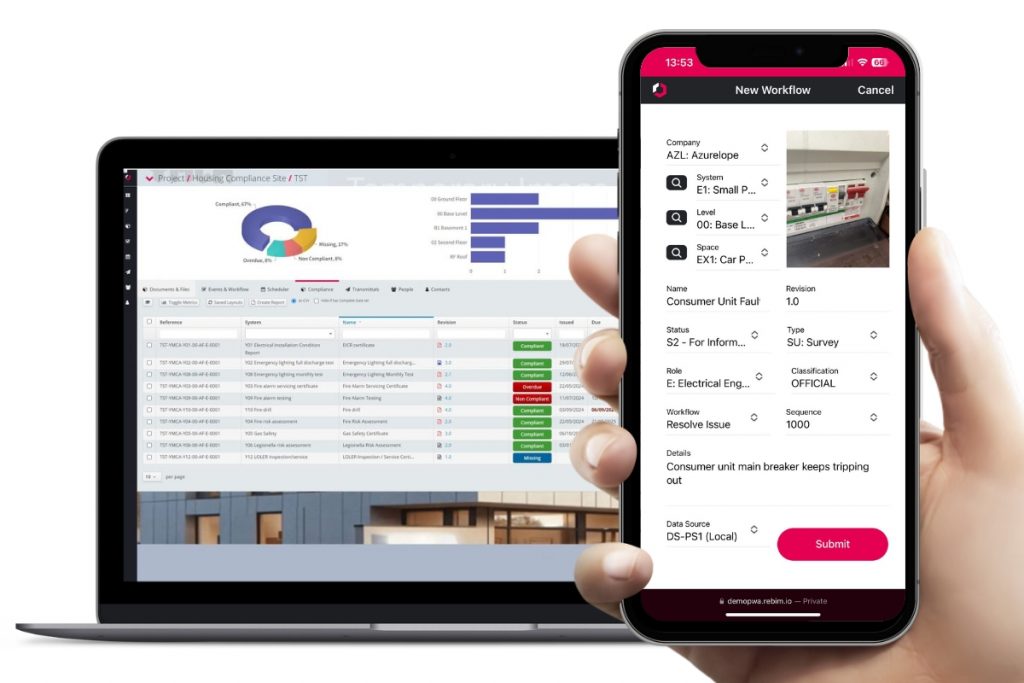
To address these challenges, many organisations are now adopting platforms that combine both structured information management and configurable operational and construction workflows.
This approach allows organisations to:
- Maintain centralised document control
- Digitise operational workflows in the same environment
- Capture site evidence directly into the information system
- Provide consistent reporting across all workflows
- Maintain a true single source of truth
Rather than separating document management and operational workflows, they become part of the same digital ecosystem.
This is increasingly aligned with the direction of ISO 19650 and the wider industry shift towards lifecycle information management.
This improves compliance, reporting, and operational efficiency.
A Practical Approach: Combining Workflow Flexibility with Information Control
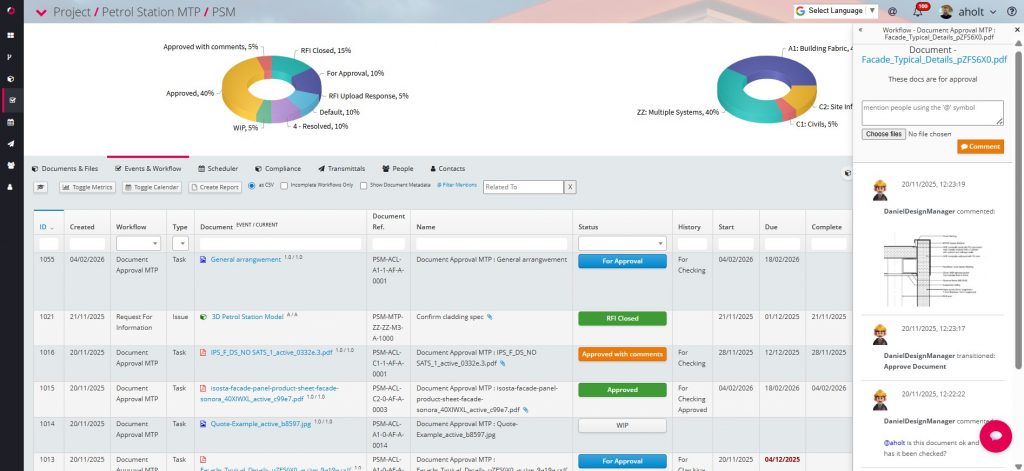
Modern platforms such as REBIM® have been designed to support both structured information management and operational and construction workflows to manage specialist tasks within a single configurable environment.
This allows organisations to:
- Manage documents and drawings in line with ISO 19650
- Digitise workflows such as inspections, fire door compliance, and safety reporting
- Capture mobile evidence directly into the central information environment
- Provide reliable, centralised reporting across projects and assets
- Integrate with existing systems where required
Importantly, the focus is not simply on providing software, but on configuring workflows correctly and supporting organisations through implementation and ongoing use.
This ensures that digital workflows are practical, usable, and aligned with real operational needs.
Conclusion: Understanding the Role of CDE vs Mobile Workflow Apps
Understanding the relationship between CDE vs mobile workflow apps is essential for organisations looking to improve their digital information management.
While Common Data Environments provide structured document control and governance, operational workflows require flexibility, usability, and reliable data capture from the field. This is why many organisations have historically used separate tools.
However, the long-term direction of the industry is clear. As highlighted in the latest ISO 19650 changes, the focus is shifting towards full lifecycle information management rather than isolated systems. Organisations are increasingly moving towards unified platforms that combine both information management and operational workflows within a single environment.
This approach improves reporting, reduces data fragmentation, and supports the creation of a true single source of truth across projects and assets.
Modern platforms such as REBIM® demonstrate how configurable workflows and structured information management can work together to support both project delivery and long-term asset management.
See our housing sector case study with One YMCA for an example of this.
For organisations looking to digitise operational workflows while maintaining robust information control, understanding how these platforms work in practice is the next step.
Learn how REBIM combines Common Data Environment functionality, configurable workflows and mobile workforce management to deliver a true single source of truth across the full asset lifecycle.